The sale isn’t the finish line — it’s the start of the relationship that actually makes a customer profitable. A well-built post-purchase email series keeps your brand top of mind after checkout, answers the questions buyers have before they ask, and nudges them toward the next purchase without you lifting a finger.
This guide walks through exactly how to plan, build, and automate a post-purchase email sequence, including what to send, when to send it, and which mistakes quietly kill repeat sales.
Quick Answer
Use an email platform with automation workflows (such as Klaviyo, Mailchimp, or Shopify Messaging) to trigger a sequence after every purchase: order confirmation and shipping updates first, then a thank-you and product education email, then a review request once the item has arrived, and finally a cross-sell or replenishment email a few weeks later. Set it up once as an automated flow and it runs for every future order.
Step-by-Step: Building the Sequence
Start by mapping the timeline from purchase to repeat purchase instead of writing emails in isolation. Most effective post-purchase sequences run over roughly 30 to 60 days and include somewhere between five and eight emails — fewer and you leave engagement on the table, many more and you risk feeling spammy and hurting deliverability.
Day 0 (order confirmation and shipping updates): These are largely transactional and often already handled by your ecommerce platform, but they’re part of the series because open rates are very high — use them to reinforce your brand voice and tease what’s coming next.
Within the first week after delivery (thank-you and onboarding): Send a genuine thank-you message, ideally paired with how-to or setup guidance for the product. This is where you reduce buyer’s remorse and support tickets at the same time.
About 7 to 14 days after delivery (review request): Once the customer has had enough time to actually use the product, ask for a review. Keep the ask to one clear action — a single button linking to your review platform — and consider offering a small incentive like a discount code for next time.
Roughly 2 to 6 weeks after delivery (cross-sell or replenishment): For consumable products, this is a reminder that they’re likely running low. For durable goods, pivot to complementary products or accessories. This email usually drives the most direct repeat revenue in the series.
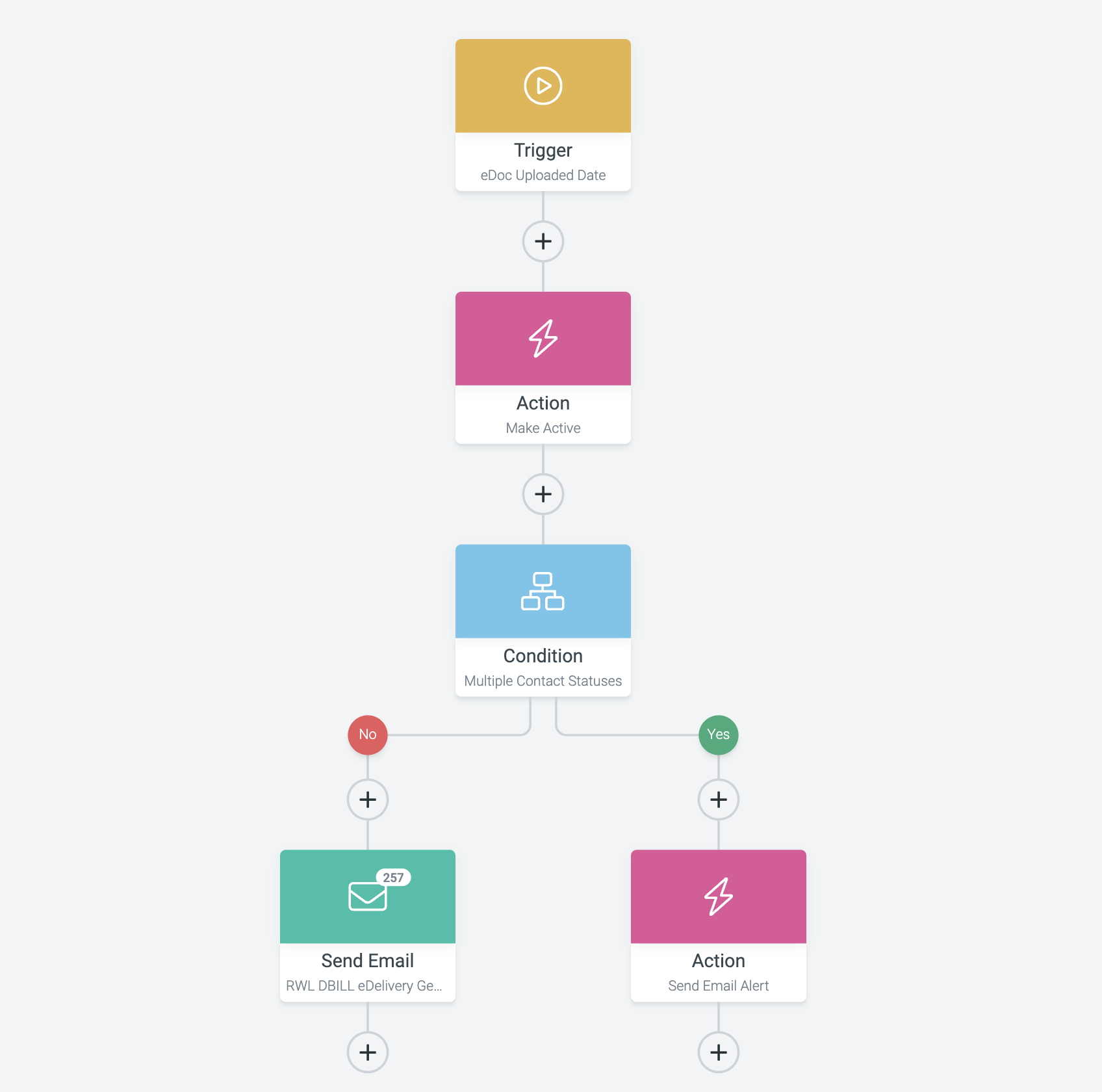
Build each stage as a step in your email platform’s automation workflow (often called a ‘flow’ or ‘journey’), triggered by the purchase event from your store, with time delays between each email rather than fixed calendar dates.
Choosing Tools and Setting Up Triggers
Platforms like Klaviyo, Omnisend, and Mailchimp all offer pre-built post-purchase flow templates that connect directly to Shopify, WooCommerce, or BigCommerce — you’re customizing an existing template more often than building from scratch. Shopify’s own built-in tool, Shopify Messaging, also supports basic automated email flows if you want to stay inside the Shopify ecosystem.
The trigger for the whole sequence is almost always ‘order placed’ or ‘order fulfilled’ from your store integration. From there, branch the flow logically: route first-time buyers differently from repeat customers, and split consumable products from one-time purchases so the replenishment email only goes to people who’d actually need it.
Segment by product category where you can. A customer who bought a coffee subscription needs a different replenishment timeline than one who bought a jacket, so if your catalog spans both, build separate flow branches rather than one generic sequence for everyone.
Tips / Common Mistakes
Don’t cram multiple asks into one email — a thank-you email asking for a review AND a referral AND a follow purchase dilutes all three. Give each email one job.
Don’t send the review request before delivery is confirmed; a request that arrives before the product does feels tone-deaf and gets ignored or unsubscribed.
Don’t forget to exclude emails already answered — if a customer leaves a review, suppress the review-request follow-ups so they don’t get asked again.
Don’t set it and forget it entirely. Check open and click rates on each step quarterly; a flow that worked at launch can go stale as your product mix or audience changes.
Do write in your brand’s actual voice rather than generic template copy — post-purchase emails get read, so they’re a real opportunity to build loyalty, not just move product.
Explore more: More marketing strategies for small businesses.
Post-purchase email automation FAQs
How long should a post-purchase email series be?
Most effective sequences run 30 to 60 days with five to eight emails total, covering order updates, a thank-you, a review request, and a cross-sell or replenishment offer.
When should I send the review request email?
Typically 7 to 14 days after delivery — long enough that the customer has used the product, but soon enough that the experience is still fresh.
Which email platform is best for post-purchase automation?
Klaviyo and Omnisend are popular for ecommerce stores needing deep automation and segmentation, while Mailchimp and Shopify Messaging (Shopify’s built-in email and SMS tool) are solid, simpler options if you’re just getting started.
Should the sequence be the same for every customer?
No — branch it by whether the product is consumable versus durable, and by whether the customer is a first-time or repeat buyer, so the timing and offers actually match their situation.
Turn Customers Into Your Growth Engine
Launch a referral program that turns happy customers into your best growth channel — with ReferralEarl. Try ReferralEarl.
Want this in your inbox? Subscribe to the free newsletter.
Photo: PathwayPort / CC0, via Wikimedia Commons.