If you’ve ever been asked to “check your referral portal” to grab a referral link or see your rewards, you’ve already bumped into one without knowing the name for it. A referral portal is the piece of software that sits behind most modern referral programs, and understanding how it works makes it a lot easier to run a program (or participate in one) without getting lost.
This guide breaks down what a referral portal actually is, how it fits into the bigger picture of referral software and referral dashboards, what metrics actually matter, and which growth strategies turn a portal from a nice-to-have into a real acquisition channel — whether you’re a small business owner thinking about launching a referral program or a customer trying to figure out where your referral rewards went.
Quick Answer
A referral portal is a dedicated online dashboard where people in a referral program get their unique referral link, see who they’ve referred, and track rewards they’ve earned. It’s the user-facing piece of a larger referral software system; the business side of that same system (often called the referral dashboard or admin dashboard) handles approvals, fraud checks, and performance reporting.
What a Referral Portal Actually Does
Think of a referral portal as the control center for a referral relationship. On the referrer’s side, it typically shows a unique tracking link or code, buttons to share that link by email, text, or social media, a running list of who has clicked or signed up through it, and a status for each reward (pending, approved, paid).
On the business side, the portal (or its admin dashboard) automates the parts that used to be manual: generating unique links for every participant, matching new signups or purchases back to the right referrer, flagging fraud or duplicate accounts, and triggering a reward once the referral meets whatever condition the business set, like a completed purchase or a set number of days as an active customer. Most referral portals also plug into other tools a business already uses, such as its CRM, email platform, or e-commerce store, so referral activity doesn’t have to be tracked in a spreadsheet by hand.
Referral Portal vs. Referral Software vs. Referral Dashboard
These three terms get used almost interchangeably, but they describe different layers of the same system. Referral software is the broadest term — it’s the overall platform that runs a referral program end to end, including the rules engine, link generation, fraud detection, integrations, and reward logic.
The referral portal is the part of that software people actually log into. For a customer or affiliate, it’s the front-end experience: grab a link, share it, check status. For a business, there’s usually a separate (but connected) admin view, which is frequently what people mean when they say referral dashboard — a reporting-focused screen showing program-wide numbers rather than one person’s individual activity. In short: referral software is the engine, the referral portal is the dashboard a participant sees, and the referral dashboard (admin side) is the dashboard the business owner sees.
Why Businesses Use One Instead of Tracking Referrals Manually
Before referral portals became common, small businesses often ran referral programs on the honor system: a customer would mention a friend’s name, and someone would manually apply a discount or write a check. That approach breaks down fast once a program grows past a handful of participants, because there’s no reliable way to confirm who referred whom, prevent the same link from being reused improperly, or keep reward payouts consistent.
A referral portal solves that by giving every participant a unique, trackable link and keeping a timestamped record of every click, signup, and conversion tied to it. That removes the guesswork, cuts down on disputes over who gets credit, and gives the business owner a single place to see whether the program is actually bringing in new customers or just creating busywork. For the person doing the referring, the portal also makes the program feel more trustworthy — instead of taking a business’s word for it that a reward is coming, they can log in and watch the referral move from “pending” to “approved” on their own.
Referral Dashboard Metrics Worth Tracking
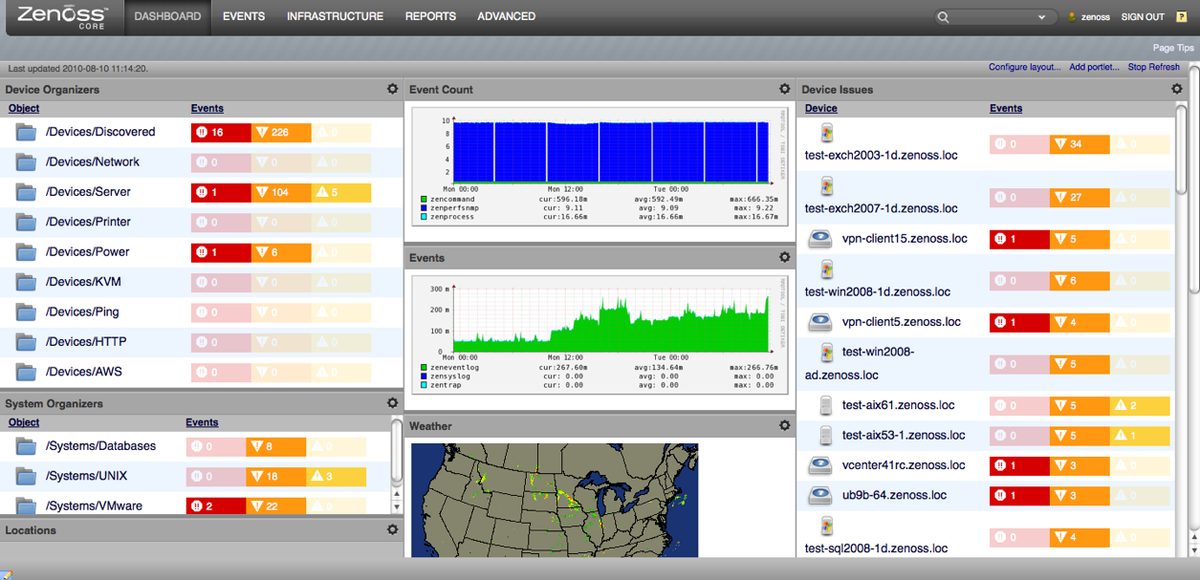
Once a program is live, the referral dashboard is where you find out whether it’s actually working. The numbers worth watching generally fall into a few groups: participation (how many eligible customers ever generate a link or share it), activity (clicks and signups the links produce), conversion (what share of those signups turn into paying customers), and payout health (how many rewards are sitting in pending status, and how long they typically take to clear).
A few dashboard habits make those numbers more useful. Compare referred customers to non-referred customers on things like repeat purchase behavior, not just the initial sale — referred customers are often stickier, and that’s a big part of the case for running a program at all. Watch for a small handful of “super-referrers” driving a disproportionate share of results, since that tells you who to nurture and reward differently. And keep an eye on stalled referrals, which usually point to a broken integration or a reward rule that’s confusing people rather than genuine low interest.
Referral Program Growth Strategies That Actually Move the Needle
A referral portal only pays off if people actually use it, so the growth strategies that matter most are the ones that reduce friction and reinforce trust. Ask at the right moment — right after a purchase, a positive support interaction, or a glowing review is when customers are most willing to share, far more than a generic email blast months later.
Make sharing nearly effortless by offering pre-written messages for email, text, and social media so the referrer doesn’t have to think of what to say. Consider rewarding both sides (the referrer and the new customer), since a one-sided reward often gets fewer people to follow through than an offer that benefits the friend too. Keep reward rules visible and simple, since confusion about what counts as a successful referral is one of the biggest silent killers of participation.
Finally, treat the program as something to iterate on rather than set and forget: test different reward types and messaging, re-engage past referrers who went quiet, and use the segments your dashboard surfaces — like top referrers or stalled accounts — to run targeted follow-ups instead of one generic campaign for everyone.
Tips / Common Mistakes
Keep the portal simple to log into. If participants need to create yet another account with a separate password just to check their referral status, many will stop bothering. Portals that let people log in with an existing email or a magic link tend to see more ongoing engagement.
Don’t let the portal sit unmonitored. Even with automation handling most of the matching and payouts, someone should periodically check the admin side for stalled referrals, obvious fraud patterns (like the same person signing up through their own link), or rewards stuck in a pending state.
Match the software to the size of your program. A very small referral program might only need basic link tracking and manual reward approval, while a larger one benefits from deeper CRM integration and automated fraud checks. Picking a tool that’s heavier than what you actually need just adds setup time and cost.
Photos
Frequently Asked Questions
Is a referral portal the same thing as referral software?
They’re closely related but not identical. Referral software is the overall system that runs a referral program, including the rules, tracking, and reward logic. The referral portal is the part of that software participants and admins actually interact with, usually as a web dashboard.
What’s the difference between a referral portal and a referral dashboard?
In practice, “referral portal” usually refers to what a referrer sees (their link, their referrals, their reward status), while “referral dashboard” more often refers to the business-facing reporting view showing program-wide performance. Some tools use the terms interchangeably, so it’s worth checking which view a product is describing.
Do I need a referral portal to run a referral program?
No, especially for a very small or informal program you could track referrals manually. But as the number of participants grows, a portal removes a lot of manual tracking, cuts down on payout disputes, and gives you real data on how the program is performing.
Can customers use a referral portal without creating an account?
It depends on the tool. Many referral portals support lightweight sign-in options, like a magic link sent to an existing email address, so participants can check their referral link and rewards without a full account setup.
What should I look at first on a new referral dashboard?
Start with participation (how many people have generated or shared a link) and payout status (how many rewards are pending versus approved). Those two numbers quickly tell you whether people are engaging and whether the back-end process is keeping up.
What’s the best referral growth strategy for a small business just starting out?
Focus on timing and simplicity before worrying about advanced tactics: ask happy customers to refer right after a good experience, make the reward and the ask easy to understand, and give referrers a simple way to check their status. Growth strategies like tiered rewards or A/B testing matter more once you have enough volume to measure them.
Turn Customers Into Your Growth Engine
Launch a referral program that turns happy customers into your best growth channel — with ReferralEarl. Try ReferralEarl.
Want this in your inbox? Subscribe to the free newsletter.