You don’t need a developer to turn happy customers into a referral channel. A handful of well-reviewed WordPress plugins handle the tracking, reward payouts, and referral portal for you, so the whole setup is point-and-click.
This guide walks through the actual steps, compares the two main approaches (a self-hosted plugin vs. a hosted referral service), and flags the mistakes that quietly sink most first attempts.
Quick Answer
Install a referral or affiliate plugin (like AffiliateWP for a fully self-hosted setup, or a hosted service such as ReferralCandy that connects via a WordPress/WooCommerce plugin), set your reward and commission rules in the plugin’s settings screen, drop the affiliate/referral dashboard onto a page using a shortcode or block, and test it with a dummy referral before promoting it. No custom code is required for any of this — most sites are live within an hour.
Step-by-Step Setup
Start by deciding what you’re selling and how a referral should be tracked. If you run a WooCommerce store, you want a plugin with native WooCommerce order-tracking. If you sell services, memberships, or digital downloads, look for a plugin that integrates with tools like Easy Digital Downloads or MemberPress instead.
Install the plugin from the WordPress dashboard (Plugins > Add New, or upload the zip if it’s a premium plugin like AffiliateWP), then activate it. A setup wizard typically walks you through connecting your store, choosing a payout method (PayPal, Stripe, or store credit are common), and setting your default commission or reward amount — a flat dollar amount, a percentage of the sale, or a discount code for the referred friend.
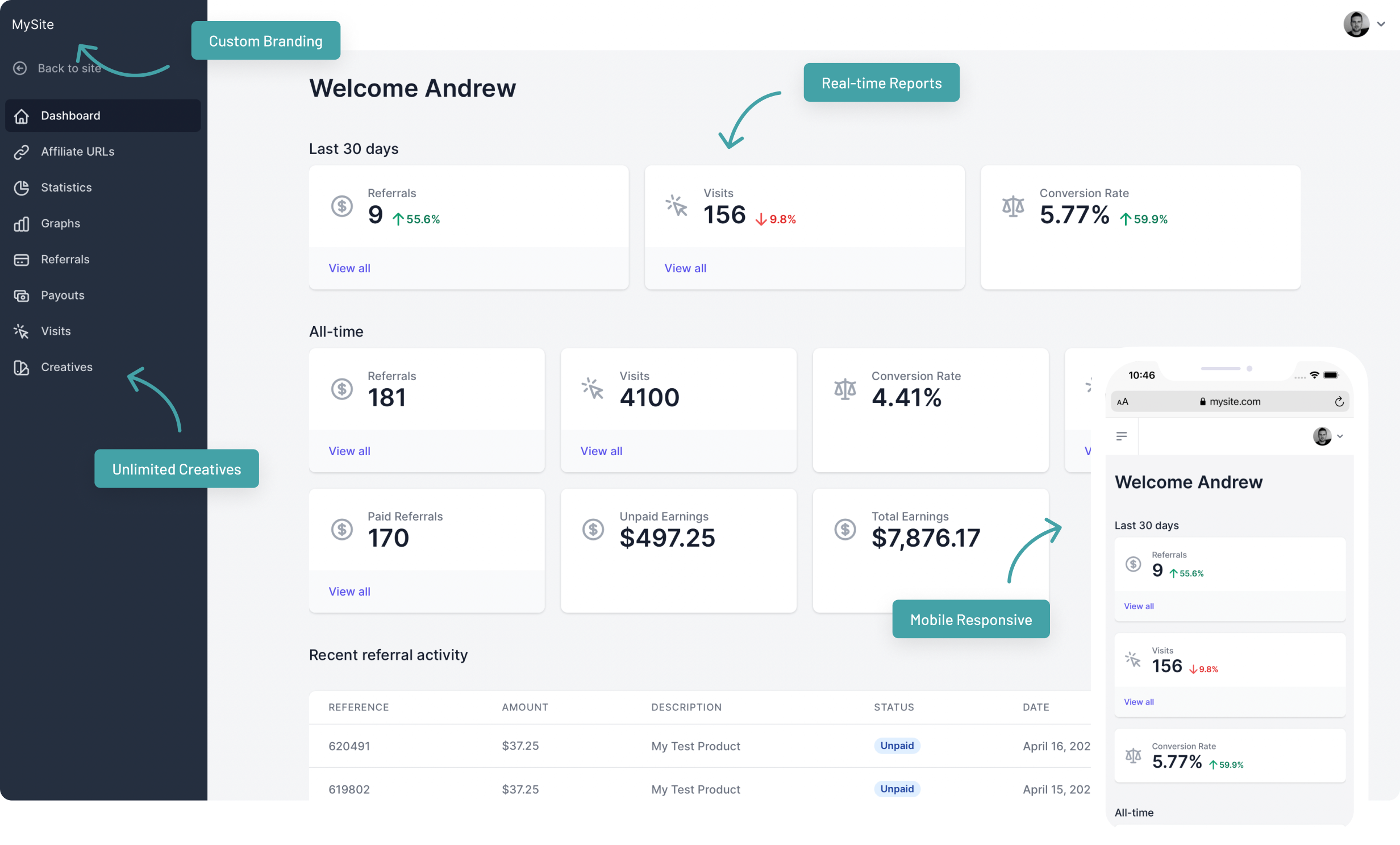
Next, add the referral dashboard to your site. Most plugins give you a shortcode or a block (e.g., an ‘Affiliate Portal’ or ‘Referral Dashboard’ block) that you drop onto any page — this is where customers or affiliates sign up, grab their unique link, and check their earnings.
Before you announce the program, run a test: open your referral link in an incognito window, complete a small purchase, and confirm the referral shows up in the plugin’s reporting with the right commission. Then add the signup link to your checkout confirmation email, account dashboard, or a dedicated ‘Refer a Friend’ page so customers actually find it.
Choosing a Plugin: Self-Hosted vs. Hosted Service
AffiliateWP is a self-hosted WordPress plugin — everything runs on your own site, and you own the data outright. It works with WooCommerce, Easy Digital Downloads, and several membership plugins, and covers affiliate coupons, a self-service affiliate dashboard, and fraud-prevention tools on higher tiers. Plans are typically sold as annual site licenses (roughly $150–$300/year for most small stores, more for bundles with extra features), with no per-sale fee on top.
ReferralCandy takes a different approach: it’s a hosted referral platform with a WooCommerce plugin that syncs your store data to ReferralCandy’s dashboard, where you manage rewards, emails, and payouts. It’s built specifically around turning existing customers into referrers (rather than recruiting bloggers/affiliates), and pricing is a monthly base fee plus a success fee on referred sales, so cost scales with how well the program performs.
If you want full ownership and a flat annual cost, lean toward a self-hosted plugin like AffiliateWP. If you want a done-for-you referral experience (reward emails, share widgets, fraud checks handled for you) and don’t mind a per-sale fee, a hosted service like ReferralCandy is usually faster to get running well.

Tips and Common Mistakes
Set clear reward terms up front — how much, for what action (signup vs. purchase), and when it pays out — and put that on the referral page itself so people aren’t guessing. Turn on any duplicate-account or self-referral checks the plugin offers; without them, people will refer themselves for the discount. Test the tracking cookie/link on mobile and in a different browser, since referral links sometimes get stripped by link shorteners or email clients. Finally, don’t just install the plugin and wait — a program only works if you actively promote it in post-purchase emails, order confirmation pages, and account dashboards.
Explore more: more referral marketing guides.
Referral program on WordPress FAQs
Do I need WooCommerce to add a referral program to WordPress?
No, but it helps. Many referral and affiliate plugins have the deepest, easiest no-code integration with WooCommerce. If you don’t use WooCommerce, look for a plugin that explicitly supports your setup (Easy Digital Downloads, MemberPress, or manual/custom link tracking).
Is it really possible to set this up with zero coding?
Yes. Reputable referral plugins are built around a setup wizard, dashboard settings, and shortcodes or blocks for the front-end referral page — no theme editing or custom code is needed for a standard setup.
What’s the difference between a referral program and an affiliate program?
In practice the tools overlap a lot, but a referral program typically rewards existing customers for referring friends, while an affiliate program recruits bloggers, influencers, or partners to promote your product for a commission. Some plugins, like AffiliateWP, can support both models at once.
Turn Customers Into Your Growth Engine
Launch a referral program that turns happy customers into your best growth channel — with ReferralEarl. Try ReferralEarl.
Images: AffiliateWP.