You know short-form video sells — TikTok, Instagram Reels, and YouTube Shorts are where a lot of small business discovery happens now. But every guide seems to assume you’re fine talking to a lens, and you’re not. Camera anxiety, privacy concerns, or just not wanting your face tied to your brand forever are all legitimate reasons to skip the talking-head format.
The good news: you don’t need to be on camera to make short-form video work. This guide walks through content formats that hide the presenter by design, the low-cost tools that make them easy to produce, and the mistakes that make faceless content look cheap instead of intentional.
Quick Answer
You can build a strong short-form video presence without appearing on camera by leaning on formats that put the product, process, or text on screen instead of your face — think hands-only demos, screen recordings, text-overlay tips, voiceover explainers, and repurposed customer content. Pair these with a text-to-speech or voice-cloning tool (CapCut’s built-in TTS is a common free starting point) and auto-captions, and viewers won’t notice — or care — that you’re not on camera.
Video Formats That Work Without Your Face
Hands-only demos are the easiest entry point: film your hands making the product, wrapping an order, plating food, or setting up a service — no face needed, and it reads as authentic behind-the-scenes content rather than a performance.
Screen recordings work well if you sell anything digital or software-adjacent. Record yourself navigating a tool, filling out a quote, or showing a before/after in a spreadsheet or design app, narrate over it, and you’ve got a tutorial that positions you as the expert.
Text-on-screen listicles (‘3 signs your HVAC needs service,’ ‘5 mistakes people make hiring a wedding florist’) work over simple b-roll or stock footage. The value is in the writing, not the visuals, so this format rewards a strong hook and clear captions more than production quality.
Voiceover explainers pair a script you record separately (or generate with AI) over footage of your workspace, product, or a whiteboard. This is the format most people mean when they say ‘faceless content’ — your voice carries the personality, your face stays out of it.
Repurposed customer content — reviews, testimonials, unboxing clips people send you, or user-generated tags — lets someone else be the face while you provide the product and the platform. This also builds social proof, which is harder to get from your own talking-head videos anyway.
Product-only or process-only content (the making of, packaging, the workshop, the kitchen) works especially well for handmade, food, and service businesses where the craft itself is visually interesting.
Tools That Make Faceless Video Easy
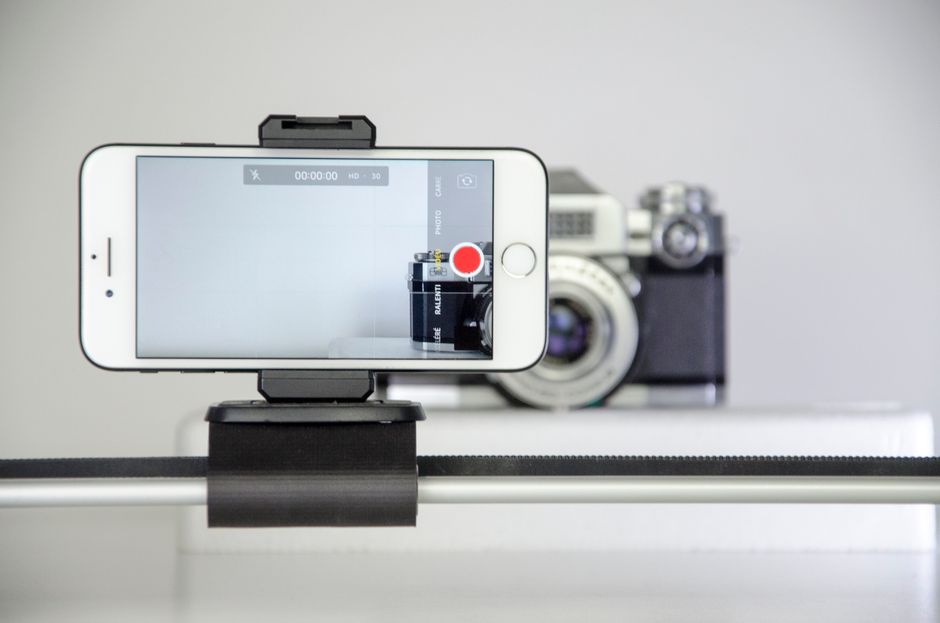
A phone tripod or small stand is the only hardware most of these formats need — stability matters more than camera quality for hands-on and screen-based content.
For voice, CapCut’s built-in text-to-speech tool offers a large library of AI voices and even a voice-cloning option that turns a short recording of your own voice into a narration voice, so you can generate voiceover without recording full takes every time. Other apps like InShot and Canva’s video editor offer similar text-to-speech and captioning features if you’re already in that ecosystem.
Auto-captions are non-negotiable — most viewers watch with sound off, and TikTok, Reels, and Shorts all have native auto-caption tools built into their editors, or you can add them in CapCut or Canva before exporting.
Screen recording is built into both iPhone (Control Center) and Android (Quick Settings), so no extra app is needed to capture tutorials or app walkthroughs.
Stock and b-roll libraries built into CapCut, Canva, and similar editors give you footage to sit behind text or voiceover when you don’t have your own visuals for a given topic.
Tips and Common Mistakes
Don’t skip the hook. Faceless or not, the first second or two still has to earn attention — lead with the most interesting frame or the boldest line of text, not a slow intro.
Avoid generic stock footage with generic AI narration — it reads as low-effort and viewers scroll past it fast. The more the footage is actually your product, your workspace, or your hands, the more it builds trust even without your face in frame.
Keep captions concise and legible — a wall of on-screen text people can’t read in a couple seconds defeats the format’s main advantage.
Don’t over-rely on one format. Mix hands-on demos, text tips, and customer content so your feed doesn’t feel repetitive.
Post consistently rather than perfectly. Faceless formats are quicker to batch-produce than talking-head video, so use that speed advantage to post more often instead of over-polishing a handful of clips.
If you’re worried faceless content feels impersonal, add your real voice as narration even if your face stays off-screen — voice alone carries a surprising amount of personality and trust.
Explore more: More marketing strategies for small business owners.
Faceless short-form video for small business FAQs
Can faceless short-form video actually grow a small business account?
Yes — plenty of accounts across TikTok, Instagram, and YouTube Shorts grow using only hands, product shots, screen recordings, and voiceover. What matters most for growth is a strong hook, useful or entertaining content, and posting consistency, not whether your face is visible.
What’s the easiest faceless format to start with?
Hands-only product or process demos are usually the easiest starting point — you’re just filming what you’re already doing (packaging an order, making a product, setting up a job) with your phone, and adding captions afterward.
Do I need expensive equipment to make these videos look professional?
No. A smartphone, a basic tripod or stand, and decent lighting (even a window) cover most of these formats. Editing apps like CapCut or Canva handle captions, voiceover, and text overlays for free or at low cost.
Will AI voiceover sound robotic and hurt my brand?
Modern AI voice tools have improved significantly and offer a wide range of natural-sounding voices, including options to clone your own voice. It’s worth testing a few voices to find one that fits your brand tone before committing to it across your content.
Turn Customers Into Your Growth Engine
Launch a referral program that turns happy customers into your best growth channel — with ReferralEarl. Try ReferralEarl.
Photo by Corentin HENRY on Pexels.