If you run a small business, you probably don’t have time to personally follow up with every new subscriber, remind every shopper who left items in their cart, or re-engage every customer who went quiet. Email marketing automation solves all of that — it lets you build sequences that trigger and send automatically based on what your contacts do, so the right message reaches the right person at exactly the right moment, without you lifting a finger each time.
This guide walks you through everything from picking a platform to building your first automation, written specifically for beginners with no prior experience. By the end, you’ll know which tool to start with, which workflows to set up first, and the mistakes that trip up most first-timers.
Quick Answer
Email marketing automation for small business means using software (like MailerLite, Brevo, or Mailchimp) to automatically send targeted emails when a subscriber takes a specific action — like signing up, making a purchase, or going inactive. Most platforms offer free plans that let you start at no cost, and the first automation every small business should set up is a welcome sequence for new subscribers.
Step 1 — Choose the Right Platform
Your platform is the foundation of everything, so pick one that balances ease of use with room to grow. Three options stand out for beginners in 2026. MailerLite is widely considered the best value-for-money choice: its free plan supports up to 250 subscribers and 2,500 emails per month, and paid plans start at $12/month (Comfort plan). It includes automation workflows, landing pages, and pop-up forms even on entry-level plans. Brevo (formerly Sendinblue) is ideal if you have a large contact list but send infrequently, since its free tier allows up to 100,000 stored contacts and approximately 9,000 emails per month (300 per day) — it charges by emails sent, not by contacts. Paid plans start at $9/month. Mailchimp is the most recognizable name and has a polished drag-and-drop builder, but its free plan is limited to 250 contacts and 500 emails per month, making it less generous for growing lists. Paid plans start at $13/month. If you’re an e-commerce store on Shopify or WooCommerce, also look at Klaviyo, which integrates deeply with store data. For more advanced multi-step workflows as you scale, ActiveCampaign is a powerful step up — though overkill for day one.
All of these platforms offer free trials or free tiers, so you can test the interface before committing. Priority criteria: drag-and-drop email builder, visual automation workflow editor, solid deliverability reputation, and integration with your website or store.
Step 2 — Build Your List the Right Way
Before you can automate anything, you need subscribers — and how you collect them matters enormously. Always build your list organically. Never buy email lists: purchased lists damage your sender reputation, tank your deliverability, and often violate privacy laws like GDPR (Europe), CAN-SPAM (US), and CASL (Canada). Instead, place a simple opt-in form on your website’s homepage, blog posts, and checkout page. Offer a lead magnet — a discount code, free guide, checklist, or mini-course — in exchange for the email address. Pop-up forms set to appear after a visitor spends 30–60 seconds on the page tend to convert well without feeling aggressive.
Also authenticate your sending domain with SPF, DKIM, and DMARC records — most platforms walk you through this setup. Authenticated domains are treated more favorably by Gmail, Outlook, and other inbox providers, which means your automated emails actually reach the inbox instead of the spam folder.
Step 3 — Set Up Your First Automations
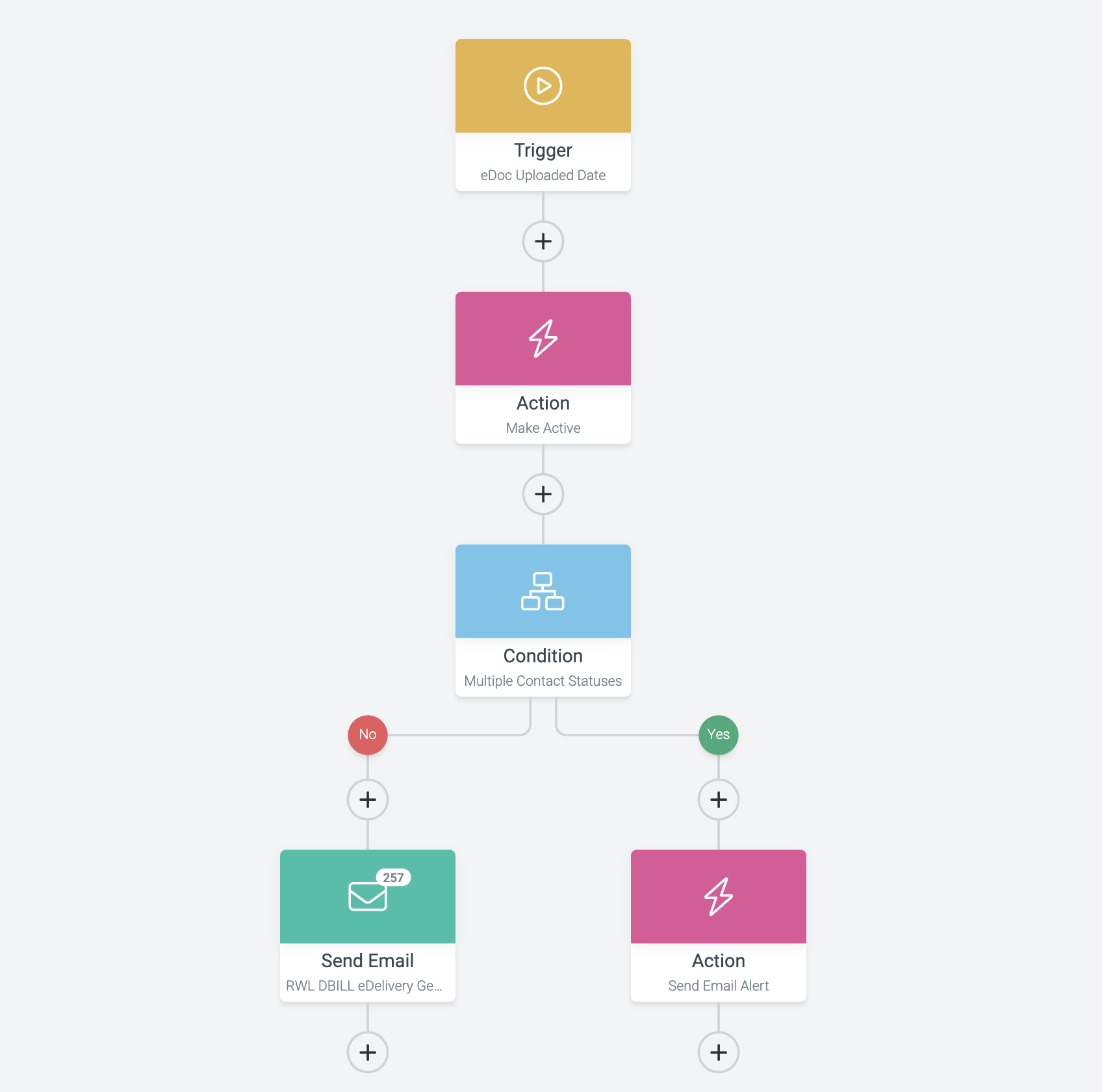
Most platforms use a visual workflow builder: you set a trigger (the event that starts the sequence), then drag in emails, time delays, and conditional branches. Here are the automations every small business should prioritize, roughly in order. The welcome sequence is the single most important one to start with. When someone subscribes, they’re at peak interest — a 3–5 email series over the first week introduces your brand, delivers your lead magnet, shares your best content, and makes a soft offer. Trigger: new subscriber joins your list. Abandoned cart reminders are essential for any business selling products online. When a shopper adds items but doesn’t check out, a reminder email (sent a few hours later, with a follow-up 24 hours after that) can recover a meaningful portion of those lost sales. Trigger: cart created but no purchase within X hours. The re-engagement campaign targets subscribers who haven’t opened or clicked anything in 60–90 days. Send a “we miss you” email with a special offer; if they still don’t engage, it’s better to remove them from your list than to keep dragging down your open rates. Trigger: no activity in X days. Post-purchase follow-ups build loyalty. Thank the customer, give order/shipping info, then follow up a week later asking for a review or suggesting a complementary product. Birthday or anniversary emails with a small discount feel personal and drive repeat purchases with very little effort once the workflow is live.
Step 4 — Segment, Personalize, and Optimize
Sending the same email blast to your entire list is one of the fastest ways to lose subscribers. Segmentation means dividing your list into groups — by purchase history, location, signup source, or engagement level — so each group gets content that’s actually relevant to them. Most platforms let you create segments based on tags or custom fields you collect at signup or via purchase data.
Personalization goes beyond using someone’s first name. Use behavioral data: if a subscriber clicked on a link about product A, tag them and add them to a sequence about that product. Keep subject lines concise (roughly 30–50 characters is a widely recommended range) and write them to spark curiosity or communicate clear value. Include one clear call-to-action per email rather than several competing links. Once your automations are live, track the metrics that actually matter: click-through rates and conversions tell you far more than open rates, which became less reliable after Apple’s Mail Privacy Protection changes. Run A/B tests on subject lines and send times to steadily improve performance.
Common Mistakes to Avoid
Buying or renting email lists is the number one mistake — it will get your account suspended and crater your sender reputation. Not testing workflows before launch is a close second: always send yourself test emails and walk through the entire sequence to catch broken links, wrong timing, or missing personalization tokens. Over-automating without personalizing is another common trap — if every email feels robotic and generic, subscribers disengage fast. Build in natural language, conversational tone, and content that genuinely helps the reader. Neglecting to prune inactive subscribers lets your list bloat with unresponsive contacts, which harms deliverability over time — run a re-engagement campaign quarterly and remove contacts who don’t respond. Finally, ignoring compliance is a legal risk: include a visible unsubscribe link in every email, include your physical mailing address, and honor opt-outs promptly.
Explore more: Marketing Strategies for Small Business.
email marketing automation for small business FAQs
How much does email marketing automation cost for a small business?
Many platforms offer free plans that cover a few hundred subscribers, which is enough to get started. MailerLite’s free plan covers up to 250 subscribers with 2,500 monthly sends; Brevo’s free tier allows up to 100,000 stored contacts and roughly 9,000 emails per month. Paid plans on these platforms typically start around $9–$13 per month for small lists, scaling up as your subscriber count or sending volume grows.
What is the best email marketing automation tool for a complete beginner?
MailerLite is consistently rated highly for ease of use and value among small business owners — its visual automation editor is beginner-friendly, and its free plan lets you build and test your first few workflows before spending anything. Brevo is a strong alternative if you have a large contact list but moderate sending volume.
How many emails should a welcome sequence have?
A welcome sequence of 3–5 emails spread over 5–7 days is a common and effective structure for small businesses. The first email delivers your lead magnet or confirms the subscription immediately, the next couple build rapport and share useful content, and the final email makes a clear but low-pressure offer. You can always expand the sequence once you see how subscribers respond.
Is email marketing automation legal? What about GDPR and CAN-SPAM?
Yes, email marketing automation is legal as long as you follow the rules of the relevant laws. In practice this means: only emailing people who have given explicit consent to hear from you, including a clear unsubscribe link in every email, honoring opt-outs promptly, and including your business name and physical address in each message. Never purchase lists or add people without permission.
Turn Customers Into Your Growth Engine
Launch a referral program that turns happy customers into your best growth channel — with ReferralEarl. Try ReferralEarl.
Photo: PathwayPort / CC0, via Wikimedia Commons.